


Since G2, one of the largest B2B software review platforms, started moving Capterra, GetApp, and Software Advice into its own vendor portal, some software vendors have been running into problems on both sides: Capterra profiles that no longer show up, Capterra logins that land on G2, and G2 listings that cannot be claimed. On September 28, 2026, G2's support team confirmed to us that these issues are related to the consolidation work and that the teams at G2 and Capterra are working on them. Blastra is helping our own customers through them in the meantime. We expect most of it to settle, and the migration of existing accounts is scheduled for November.
What is happening, in short
G2 is preparing to run all four sites from one vendor portal, my.G2, starting in November 2026. Until then, the old Capterra back office and the new one run side by side, and what you run into depends on which listings you had before the change:
- New vendors are already sent to G2 to submit a product. Capterra, GetApp, and Software Advice appear as checkboxes on that one G2 form, and the old Capterra get-listed page now redirects to G2's add-product page. Their listings are managed from my.G2, and they have no access to the old Capterra back office, which is where Capterra's pay-per-click advertising has always been set up.
- Vendors with a G2 listing and no Capterra listing cannot add a Capterra listing yet; as of September 28, existing G2 accounts have no option for it.
- Vendors with both a G2 and a Capterra listing look unaffected for now. Their accounts are the ones the November migration will move.
November is G2's plan, and dates for a migration this size can move.
My Capterra profile disappeared
We saw a version of this on our own listing: my.G2 showed it as "Published" on Capterra, and the product was missing from capterra.com. A listing can drop off the public site while the vendor portal still shows it as live, which suggests that during the consolidation the portal and the public site are updated separately.
What to do:
- Search capterra.com for your product while logged out, and compare with the Capterra card in my.G2 and with the old Capterra back office at
app.g2digitalmarkets.com. - Write to G2 support with your product name and the URL your listing used to have, and say it looks related to the consolidation. Support already knows about this class of issue.
- Avoid resubmitting the product from scratch. A second submission can create a duplicate listing that later has to be merged, and your existing reviews sit on the original.
I cannot log in to Capterra, or my Capterra login takes me to G2
For new submissions this is by design: Capterra now routes vendors to G2. If you already had a Capterra listing, your account lives in the old Gartner-era back office, which now sits at app.g2digitalmarkets.com under a G2 logo. Log in there directly. If that login fails too, it belongs with G2 support as a consolidation issue.
I cannot set up Capterra PPC for a listing created through G2
Capterra's pay-per-click (PPC) advertising, where you pay for each buyer who clicks through from Capterra, GetApp, or Software Advice to your site, has always been run from the Gartner-era back office. Vendors whose Capterra listing was created through G2's new submission flow manage it from my.G2 and have no login to that back office. We have not found a way to launch a Capterra PPC campaign for these listings: my.G2 has an Advertising section, and we have not seen a Capterra PPC budget run from it. If you need PPC on Capterra now, ask G2 support or your G2 account manager how to start a campaign for a listing that lives in my.G2, and we will update this post when we find the route.
I cannot claim my G2 listing
Claiming a G2 listing is free, and G2 support has told us claim requests are among the issues tied to the consolidation. Sign in with an email on your product's own domain, which the new flow already asks for before it will publish to the other three sites, and if the claim still does not go through, contact G2 support and mention the consolidation so the request reaches the team working on it.
My G2 or Capterra account was suspended
We have also seen some vendor accounts suspended in the same weeks. We do not know whether this is related to the merge, and G2 has not said that it is. If it happens to you, ask G2 support for the reason in writing before changing anything on the listing, and keep a record of your listing content so it can be restored if the account comes back.
What to watch in November
The full merge is expected in November, and that is when existing accounts with listings on both G2 and Capterra should be migrated. Any migration moves data from one system into another, and fields that do not map one to one can be dropped along the way: descriptions, screenshots, categories, pricing, integrations, and replies to reviews. Before November, save a copy of each listing as it is today, including your descriptions, category choices, screenshot set, and review counts on every site, so that after the migration you can compare field by field and ask for anything missing to be put back.
How Blastra is helping
We monitor our customers' listings across G2, Capterra, GetApp, and Software Advice, and when a listing drops or loses content we flag it and work with the directory to restore it. We will be doing the same through the November migration. If you want your listings watched too, you can sign up and we will take them on.
What we saw in my.G2 on September 20
The rest of this post is our walkthrough of the new vendor portal on September 20, the day it first showed all four sites.
We logged into my.G2, G2's vendor portal, on September 20 and found a Listings page that shows G2, Capterra, GetApp, and Software Advice side by side, a shared product profile feeding all four, and a banner at the top saying that in November my.G2 "will be your single platform to manage your presence across G2, Capterra, GetApp, and Software Advice." That is seven and a half months after G2, the largest B2B software review platform, closed its purchase of Capterra, GetApp, and Software Advice, the three software directories Gartner ran as a group, on February 5, 2026, and the first time listings management for all four sites has sat in one place.

As of the day we checked, G2's 2026 release notes ran through August and covered Buyer Intent, G2's paid feed of which companies are researching your category, pulling signals from all four sites, which was the first time the G2 and former Gartner systems fed one feature. The Listings change is not in the notes yet and had no press coverage we could find, though G2's public add-product page now describes it in one line, promising to "manage your product profile, analyze buyer activity and grow with your brand across G2 properties". It is the second merge, and it reaches the screens vendors use every day.
What is shared, and what is per marketplace
The Listings page has five cards: four are the marketplaces, each with its own "Published" status and a completion meter, and the fifth is called Cross-Marketplaces. Its description explains the model in one line: "Core product information used across all Marketplaces unless overridden."
So there is one profile with tabs for Product Information, Packages & Pricing, Categories & Features, Integrations, and Target Buyers. Before this, Capterra, GetApp, and Software Advice already shared a back office (the old Gartner Digital Markets cabinet), but each site was claimed separately, and G2 sat in a different cabinet. Now one form is the default for all four, and each site keeps its own short list of fields on top. One Categories & Features tab feeds four separate category lists; nothing on the page says the four have been aligned, so we read it as one form in front of four lists until G2 says otherwise.
Submission already crosses over
The change is most visible in the new submission flow, titled "Add your Product to G2 Marketplaces", where one of the steps is "Choose Where to Publish". G2 is always included. Capterra, GetApp, and Software Advice are checkboxes, all three ticked when we reached the step, with one condition: "To be eligible for cross-publishing, make sure you're logged in with a business email belonging to this product."

On that screen G2 describes itself as "Subscription-based listing included with every submission" and Capterra as "Pay-per-click model." The cabinet merged and the two pricing models are still described as two; G2 has not said whether they will ever share an invoice.
What is missing, and what is rough
Reviews are still separate, with the pools working the way they did in February: one shared by the three former Gartner sites, one on G2, and nothing we saw in the cabinet suggesting a G2 review reaches Capterra or the other way round. Our hope is that this is what the November release brings, but the banner's promise is limited to a single platform for managing your presence.
Parts of it do not work yet: our listing showed "Published" on Capterra inside my.G2, and the same product was absent from capterra.com when we looked. That could be a delay before the cabinet's change reaches the public site, Capterra's catalog review (the check that a product fits one of its categories before it goes live) doing its job behind the new status label, or a bug. It reads like the kind of thing that gets fixed quickly. G2's card has an edit button while the three Capterra-side cards only link out to their public sites, so per-site edits for those three still happen elsewhere, and nothing on the page says whether the old Gartner Digital Markets cabinet stays open after November. Keep that login for now.
The listings are still four listings
The vendor side merged while the buyer side stayed as it was: a buyer comparing tools on Capterra sees a Capterra listing, with Capterra's reviews and Capterra's ranking, and a buyer on G2 sees a G2 listing. The AI assistants that read directories to decide what to recommend see four sites, with two review pools between them and four category lists, and cite each site on its own.
That separation is the strength of this ecosystem for a vendor: one profile to maintain, four listings that can each be cited. A wrong integration list or an outdated pricing tier in Cross-Marketplaces is now wrong on four sites, and an AI assistant reading all of them would meet the same mistake everywhere and take it for agreement. All four are one company's sites on one roadmap, which is also the argument for keeping the review directories G2 does not own, TrustRadius, SourceForge, and Gartner Peer Insights, current alongside them.
What to check in the shared profile
- Open my.G2 → Listings → Cross-Marketplaces and read every tab as public copy, because it already feeds all four sites. Fix anything stale first.
- Check each marketplace card against the live site. The two disagreed for our own listing.
- Leave the cross-publish checkboxes ticked only if your product fits a category on those sites. Nothing in the flow says Capterra's catalog review has been switched off for one-click submissions.
- Keep concentrating review collection on one side. Until a review left on G2 also appears on the other three, splitting your reviewers across both pools leaves you with two thin profiles.
One more thing in the cabinet: G2 Coins
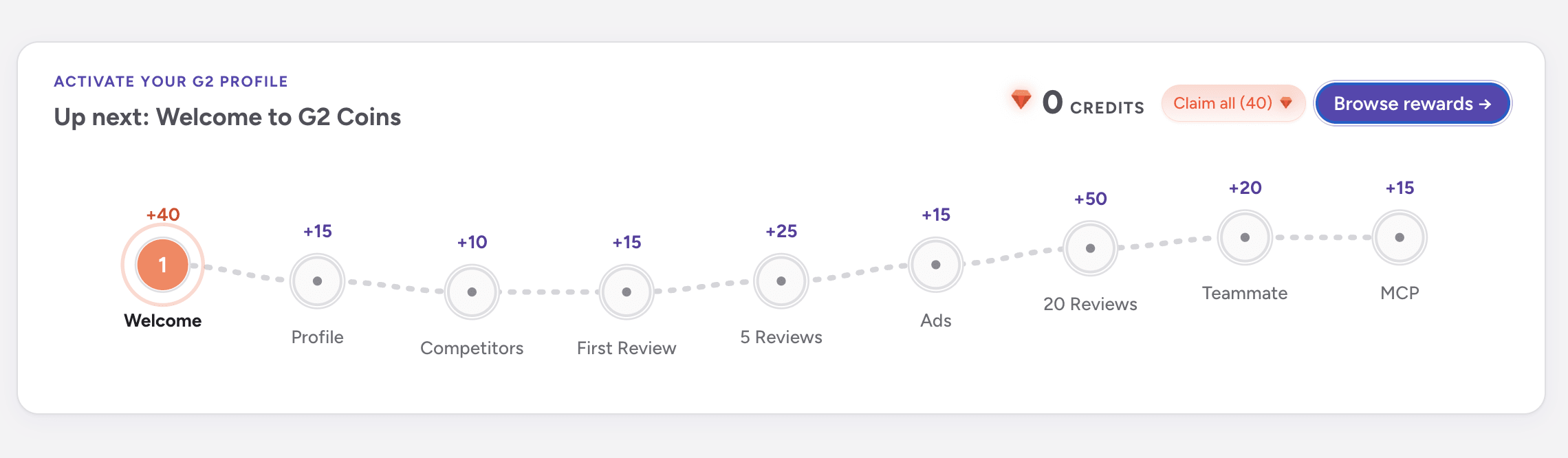
The same session gave us a look at something else G2 is building for vendors, and this one is gamification. my.G2 carries an "Activate your G2 profile" strip with a dotted path of nine steps, each worth coins: Welcome (+40), Profile (+15), Competitors (+10), First Review (+15), 5 Reviews (+25), Ads (+15), 20 Reviews (+50), Teammate (+20), and MCP (+15). A "Browse rewards" button opens The Vault, tagged Beta, where the coins are spent.
The Vault sorts its rewards into tiers with the vocabulary of a collectible card game. Common is "Quick Wins" (a 30-day Visibility Score Comparison for 10 coins). Rare is "Power Moves" (30 days of Buyer Journey Analytics for 15 coins, $100 of Review Incentive Credits for 75, and $100 of G2 Ads Credits, which showed as already active on our account). Epic is "Game Changers", described as "premium features for serious growth", and its cards sat below the fold of our screenshot.

All nine steps add up to 205 coins. Twenty reviews is the largest step at 50, and with the 40 welcome coins it covers the $100 of Review Incentive Credits with change, so the vendor who brings in reviews is handed what looks like budget to bring in more. MCP is on the path as well, at 15 coins: that is the Model Context Protocol, the standard that lets an AI assistant read a platform's data directly, and G2 has an integration, so the step presumably rewards connecting it. What we could not tell from the screen is whether coins are live for every vendor or a beta cohort, and whether the rewards sit beside paid plans or unlock things that are otherwise paid; analytics and G2-run incentivized review campaigns are paid-plan features on G2 today. We have not seen a software directory reward vendors in its own currency for filling in a profile before, and the Epic tier is the part we want to see next.
Related Reading
- What the G2–Capterra Acquisition Means for B2B SaaS Vendor Strategy - The strategic read on badges, taxonomy, and pricing, with each milestone noted as it lands
- Capterra Pricing for Vendors (2026): Free vs Paid Plans - Why subscription and pay-per-click stay different even inside one cabinet
- How to Get Reviews on G2 and Capterra - Two review pools, one collection strategy
- G2's Acquisition of Capterra Has Closed - Where this started, in February
Keep your listings intact through the G2 migration
Blastra submits and updates your listings across G2, Capterra, GetApp, Software Advice, and dozens of other B2B software directories, each one built out and optimized for AI answers, and shows you when a listing drifts as G2 changes the cabinet.